Explainers
WhatsApp Business API vs the WhatsApp Business app: which one does your business need?
The free WhatsApp Business app and the WhatsApp Business API look similar but solve very different problems. Here's how to know which one your business actually needs.
By Aayush · Developer
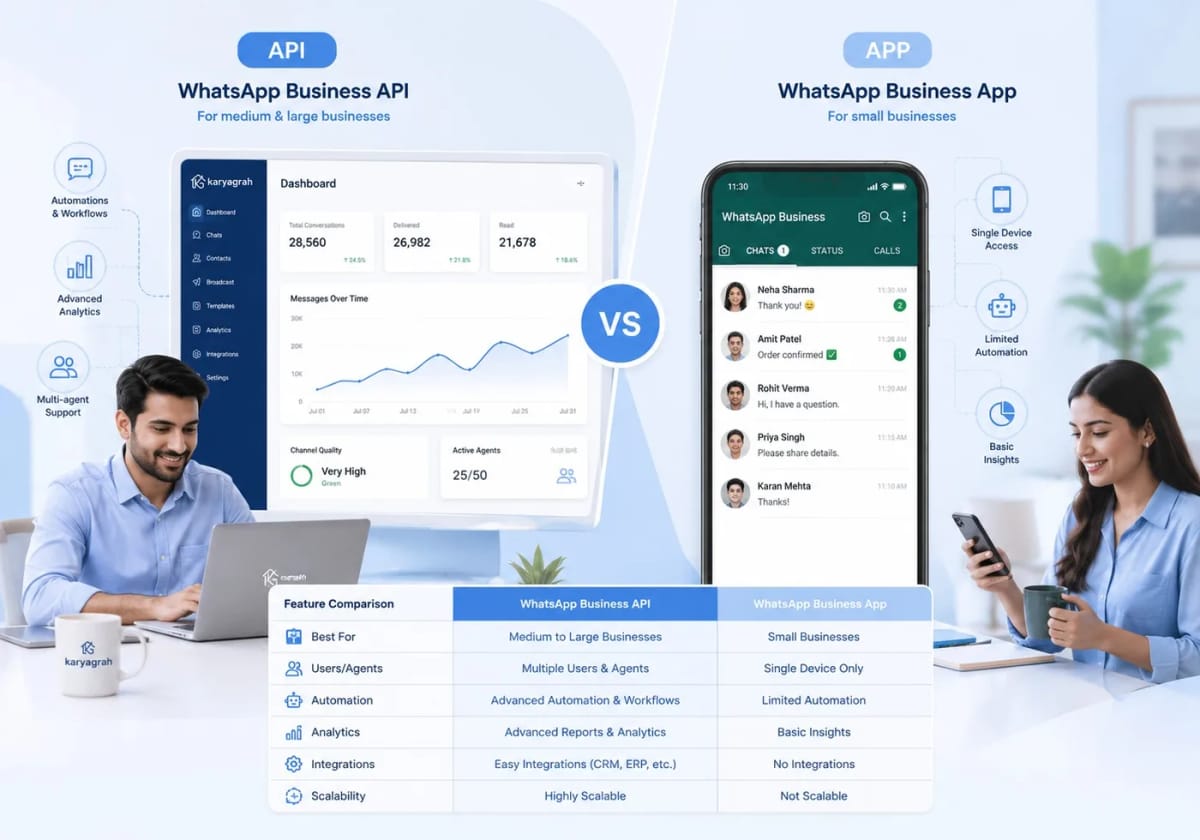
The short answer
If one person handles all your WhatsApp chats on one phone, the free WhatsApp Business app is fine. The moment you need a team sharing one number, automated replies, or broadcasts to thousands, you need the WhatsApp Business API.
They are not competing apps — the API is the grown-up version of the same thing, built for businesses that have outgrown a single phone.
The WhatsApp Business app: simple, single-phone, free
The Business app is a free download that runs on one phone (with a linked desktop). It gives you a business profile, quick replies, labels, and a catalogue. It is perfect for a solo owner or a very small shop.
Its limits show up fast: the number lives on one device, only a few people can use it at once, broadcast lists are capped and only reach saved contacts, and there is no real automation or reporting.
The WhatsApp Business API: teams, automation, scale
The API has no app of its own — you connect it to a platform like Karyagrah, which becomes your inbox and control panel. That unlocks the things a growing business needs: a shared team inbox on one number, role-based access, chatbots and auto-replies, broadcasts to thousands using approved templates, and full delivery analytics.
It also keeps the business in control. The number and every conversation belong to the company, not to whichever employee had the phone — so nothing walks out the door when someone leaves.
A quick side-by-side
Team access: the app centres on one phone with linked devices; the API is designed for teams working one number together.
Automation: the app has quick replies; the API supports chatbots, flows, and scheduled drips.
Broadcasts: the app uses limited lists of saved contacts; the API supports larger, consent-based campaigns with approved templates.
Analytics: the app shows basic counts; the API provides sent, delivered, read, and failed reporting per campaign.
Cost: the app is free; an API setup combines software subscription costs with Meta's current per-message charges.
How to decide
Ask three questions. Does more than one person need to reply from the same number? Do you want to send offers or reminders to a large list? Do you want chatbots to answer common questions automatically?
If the answer to any of those is yes, the free app will hold you back, and the WhatsApp Business API is the right move. Karyagrah handles the setup, so you get the API's power without the technical work.
Official sources and further reading
WhatsApp policies, product behaviour and pricing can change. Refer to these first-party resources for current rules.
- About the WhatsApp Business Platform — Meta for Developers
- WhatsApp Business Platform pricing — Meta for Developers
- WhatsApp Embedded Signup overview — Meta for Developers
Frequently asked questions
Is the WhatsApp Business API free?
Meta applies messaging charges based on message category and recipient country, and you need software such as Karyagrah to operate the inbox and automation. The WhatsApp Business app itself is free to download.
Can I move my existing WhatsApp Business number to the API?
Often yes. Depending on account and onboarding eligibility, Meta may support Business App coexistence; otherwise the number is migrated to the platform and stops working in the normal app. Confirm the available flow before switching.
Can multiple agents use one number on the API?
Yes. That is one of the biggest reasons to move to the API — your whole team shares a single business number through one inbox, with each chat assigned to the right agent.
Do I need a developer to use the WhatsApp Business API?
No. Platforms like Karyagrah give you a no-code setup and a ready-made inbox, so you get all the API's capabilities without writing any code.