Playbooks
WhatsApp lead generation automation: workflows that qualify and convert enquiries
Build a practical WhatsApp lead-generation workflow that captures consent, qualifies enquiries, creates CRM records, schedules follow-ups, and hands high-intent leads to sales.
By Prajwal · Data Analyst / Data Science
Automation begins before the first message
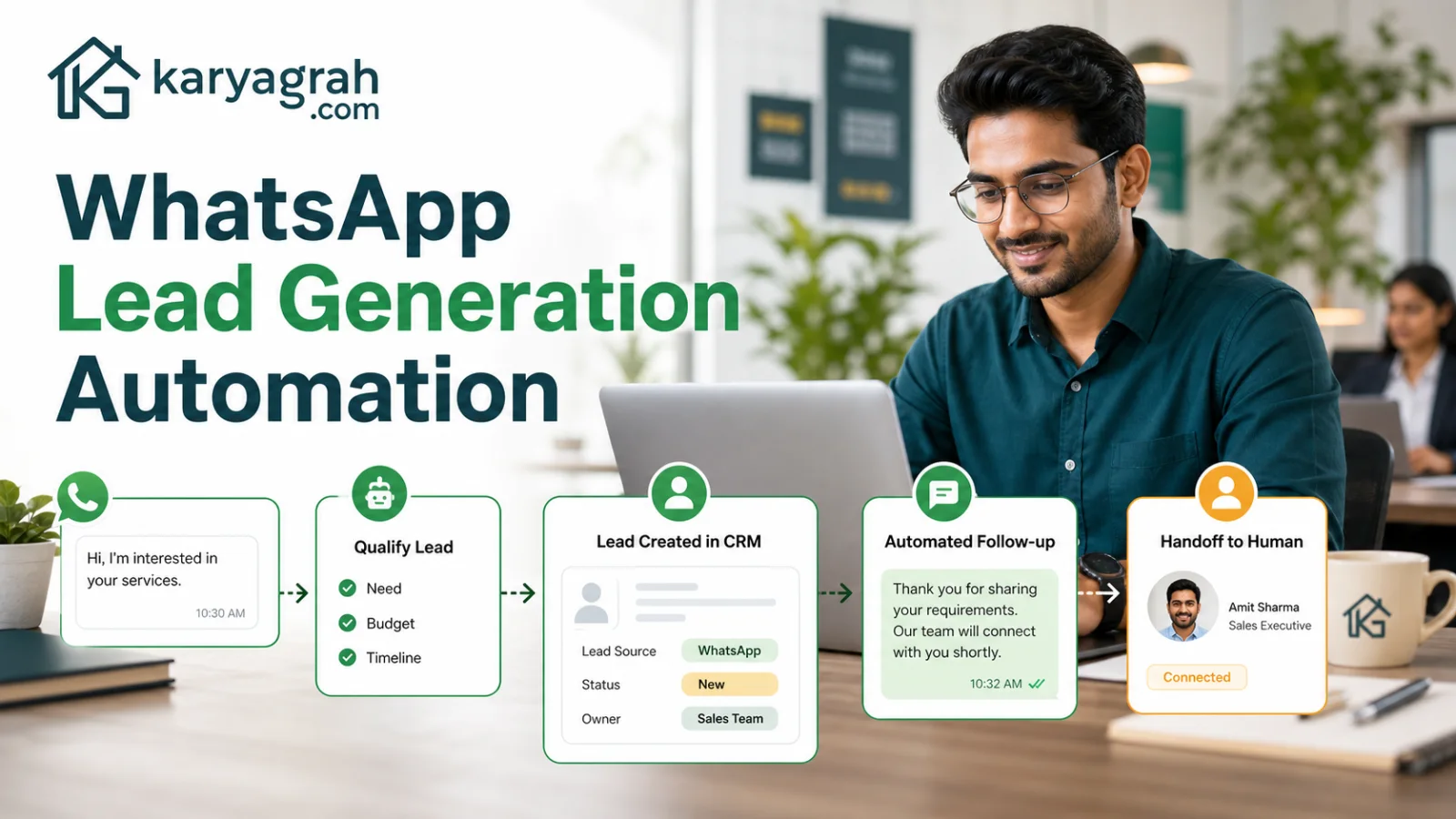
A strong WhatsApp lead workflow starts with a clear entry point and consent. Leads may arrive from a click-to-WhatsApp ad, website button, QR code, campaign reply, or an existing customer list. The promise at that entry point should match what happens in chat. If the ad offers a quotation, the first questions should help prepare that quotation rather than forcing the person through a generic menu.
Record the source and consent context with the lead. This lets the team measure which channels produce qualified enquiries and keeps future communication relevant.
Capture only the information sales will use
The first automation should be short. Ask for the minimum details needed to route or qualify the enquiry: requirement, location, budget range, preferred timing, product, or order reference. Use buttons and WhatsApp Flows when structured choices reduce typing, but allow free text where the customer needs to explain.
Every extra question creates friction. If an answer can be collected later by the assigned salesperson, do not block the lead at the first step. The goal is to create momentum and context, not to reproduce a long website form inside chat.
Turn the conversation into a CRM lead
Once the minimum details are captured, create or update the contact instead of making a duplicate. Save the source, answers, tags, and conversation link, then place the lead in a clear stage such as New or Qualified. Assignment rules can route by branch, product, language, geography, workload, or campaign.
The sales agent should open the lead and immediately understand why the person contacted the business, what the automation collected, and what action is due next. If that context is missing, automation has only moved manual work rather than reducing it.
Follow up based on behaviour, not spam
Useful follow-up responds to intent. A person who requested pricing may receive the promised details and a reminder if they do not reply. A lead who selected a later purchase date can return to a scheduled queue. Someone who opted out should stop immediately.
Use approved templates when the business reopens a conversation outside the service window, and keep each message tied to the original request. Cap the sequence, vary the timing based on the buying cycle, and send high-intent replies to a human quickly. More automated messages do not automatically create more sales.
Three practical workflow examples
Real estate: collect preferred area, property type, budget, and visit timing, then assign by territory. Education: collect course interest, qualification, city, and callback time, then route to the relevant counsellor. Retail or D2C: capture the product, size or variant, location, and purchase question, then hand off to sales or share catalogue options.
The structure is consistent: clear entry promise, short qualification, deduplicated CRM record, correct owner, timely human response, and measured follow-up. Only the questions and routing logic change by industry.
Measure the funnel and improve one step at a time
Track more than the number of incoming chats. Measure qualification completion, time to human response, contact rate, stage conversion, opt-outs, and the outcome by source. Review where people abandon the flow and where agents fail to follow up.
Karyagrah connects chatbots, WhatsApp Flows, contacts, lead stages, assignments, campaigns, drip journeys, and a shared inbox so the workflow stays in one operating system. Begin with one source and one offer, validate the handoff with your sales team, then expand after the data shows where automation helps.
Official sources and further reading
WhatsApp policies, product behaviour and pricing can change. Refer to these first-party resources for current rules.
- About the WhatsApp Business Platform — Meta for Developers
- WhatsApp Business Messaging Policy — WhatsApp
Frequently asked questions
Can WhatsApp automatically create a lead in a CRM?
Yes. A workflow can capture the customer's answers, create or update the contact, set a lead stage, record the source, and assign an owner without manual data entry.
What should a WhatsApp qualification bot ask?
Ask only what changes routing or the next sales action, such as requirement, location, product, budget range, and preferred timing. Keep the first interaction short.
Can I automate follow-ups to WhatsApp leads?
Yes, using consent-aware drip journeys and approved templates when required. Set a clear limit, stop on reply or opt-out, and route high-intent responses to a human.
Which businesses can use WhatsApp lead automation?
It is useful wherever enquiries need qualification and follow-up, including real estate, education, healthcare, travel, local services, retail, and B2B sales.